
Stories
CleverPush Story Widget
You can also implement CleverPush Stories into your application. For this, please set up a Story Widget in your CleverPush account. You can access stories via generated Widget Id and by following usage guide.
Call the Story Widget after SDK initialization is complete.
Story View
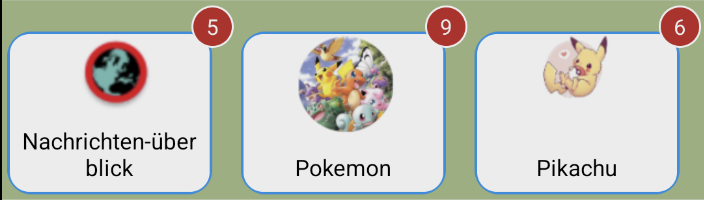
How to use
Add the following code to your project:
@override
Widget build(BuildContext context) {
  return MaterialApp(
    initialRoute: '/',
    routes: <String, WidgetBuilder>{
      '/': (BuildContext context) {
        return Scaffold(
          body: Container(
            padding: EdgeInsets.all(10.0),
            child: SingleChildScrollView(
              child: Table(
                children: [
                  TableRow(children: [
                    CleverPushButton("Story View", () {
                      Navigator.pushNamed(context, '/story');
                    }, true),
                  ]),
                ],
              ),
            ),
          ),
        );
      },
      '/story': (BuildContext context) {
        final isDarkMode = MediaQuery.of(context).platformBrightness == Brightness.dark;
        return Scaffold(
          appBar: AppBar(
            title: const Text('Story View'),
          ),
          body: _isInitialized
              ? CleverPushStoryView(
                  widgetId: 'WIDGET_ID',
                  storyViewHeightAndroid: CleverPushStoryViewSize.wrapContent,
                  storyViewWidthAndroid: CleverPushStoryViewSize.matchParent,
                  storyViewHeightiOS: 130,
                  storyViewWidthiOS: MediaQuery.of(context).size.width.toInt(),
                  onOpened: (url) {
                    print('CleverPush storyView opened: ${url.toString()}');
                  },
                  darkModeEnabled: isDarkMode,

                  // BACKGROUND & TEXT COLORS
                  backgroundColor: "#A4BD87",
                  backgroundColorDarkMode: "#A4BD87",
                  textColor: "#000000",
                  textColorDarkMode: "#2196F3",

                  // TITLE ATTRIBUTES
                  titleVisibility: CleverPushVisibility.visible,
                  titlePosition: CleverPushStoryTitlePosition.positionInsideBottom,
                  titleTextSize: 38,
                  titleMinTextSize: 35,
                  titleMaxTextSize: 40,

                  // STORY ICON ATTRIBUTES
                  storyIconHeight: 90,
                  storyIconHeightPercentage: 75,
                  storyIconWidth: 85,
                  storyIconCornerRadius: 30.0,
                  storyIconSpace: 0.0,
                  storyIconShadow: false,

                  // BORDER ATTRIBUTES
                  borderVisibility: CleverPushVisibility.visible,
                  borderMargin: 4,
                  borderWidth: 5,
                  borderColor: "#2196F3",
                  borderColorDarkMode: "#FFC107",
                  borderColorLoading: "#B66C54",
                  borderColorLoadingDarkMode: "#4CAF50",

                  // SUB-STORY UNREAD COUNT ATTRIBUTES
                  subStoryUnreadCountVisibility: CleverPushVisibility.visible,
                  subStoryUnreadCountBackgroundColor: "#C62828",
                  subStoryUnreadCountBackgroundColorDarkMode: "#000000",
                  subStoryUnreadCountTextColor: "#FFFFFF",
                  subStoryUnreadCountTextColorDarkMode: "#FFFFFF",
                  subStoryUnreadCountBadgeHeight: 65,
                  subStoryUnreadCountBadgeWidth: 65,

                  // BEHAVIOR ATTRIBUTES
                  restrictToItems: 3,
                  closeButtonPosition: CleverPushStoryCloseButtonPosition.right,
                  sortToLastIndex: CleverPushStorySortToLastIndex.positionDefault,
                )
              : const Center(child: Text('Initializing...')),
        );
      },
    },
  );
}
Handling Opened URLs in Stories
You can handle URLs opened in stories as follows:
return Scaffold(
  appBar: AppBar(
    title: const Text('Story View'),
  ),
  body: Container(
    child: _isInitialized
        ? CleverPushStoryView(
            widgetId: 'WIDGET_ID',
            onOpened: (url) {
              print('CleverPush storyView opened: ${url.toString()}');
            },
          )
        : const Center(child: Text('Initializing...')),
  ),
);
Customizing StoryView
You can customize the experience of CleverPushStoryView using these attributes:
widgetId: Specifies the ID of the story widget.storyViewHeightAndroid: Sets the height of the story view on Android. Accepts an integer value in dp,CleverPushStoryViewSize.matchParent, orCleverPushStoryViewSize.wrapContent.storyViewWidthAndroid: Sets the width of the story view on Android. Accepts an integer value in dp,CleverPushStoryViewSize.matchParent, orCleverPushStoryViewSize.wrapContent.storyViewHeightiOS: Sets the height of the story view on iOS (integer).storyViewWidthiOS: Sets the width of the story view on iOS (integer).backgroundColor: Sets the background color of the story view.backgroundColorDarkMode: Specifies the background color in dark mode.textColor: Specifies the color of the story title in the story view.textColorDarkMode: Specifies the text color in dark mode.fontFamily: Sets the font family for the story title.titleVisibility: Controls the visibility of the story title (CleverPushVisibility.visibleorCleverPushVisibility.gone).titleTextSize: Sets the size of the story title text (integer).titleMaxTextSize: Specifies the maximum text size for the story title. This allows text to grow only up to the defined size (integer).titleMinTextSize: Specifies the minimum text size for the story title. This allows text to shrink to a specified size on smaller screens (integer).titlePosition: Defines the position of the title. Options:CleverPushStoryTitlePosition.positionDefaultCleverPushStoryTitlePosition.positionInsideBottomCleverPushStoryTitlePosition.positionInsideTop
storyIconHeight: Defines the height of the story icon in dp (integer).storyIconHeightPercentage: Calculates the height of the story icon based on its width, setting the height as a percentage of the width (integer).storyIconWidth: Defines the width of the story icon in dp (integer).storyIconCornerRadius: Sets the corner radius of the story icon (double).storyIconSpace: Specifies the space between individual stories in dp (double).storyIconShadow: Enables or disables a shadow around the story icon (boolean).borderVisibility: Controls the visibility of the border around the story (CleverPushVisibility.visibleorCleverPushVisibility.gone).borderMargin: Sets the margin between the border and the story icon in dp (double).borderWidth: Defines the width of the border around the story in dp (integer).borderColor: Defines the color of the border around the story.borderColorDarkMode: Specifies the border color in dark mode.borderColorLoading: Specifies the color of the border during loading detail screen.borderColorLoadingDarkMode: Specifies the border color during loading detail screen in dark mode.subStoryUnreadCountVisibility: Controls the visibility of the unread count for sub-stories (CleverPushVisibility.visibleorCleverPushVisibility.gone).subStoryUnreadCountBadgeHeight: Sets the height of the unread count badge (integer).subStoryUnreadCountBadgeWidth: Sets the width of the unread count badge (integer).subStoryUnreadCountBackgroundColor: Sets the background color of the sub-story unread count badge.subStoryUnreadCountBackgroundColorDarkMode: Specifies the background color of the unread count badge in dark mode.subStoryUnreadCountTextColor: Specifies the text color of the sub-story unread count badge.subStoryUnreadCountTextColorDarkMode: Specifies the text color of the unread count badge in dark mode.restrictToItems: Sets the number of widgets to display on the screen (integer).closeButtonPosition: Sets the position of the close button (CleverPushStoryCloseButtonPosition.leftorCleverPushStoryCloseButtonPosition.right).sortToLastIndex: Determines whether seen stories are moved to the end of the list or remain in their default position. Options:CleverPushStorySortToLastIndex.positionDefaultCleverPushStorySortToLastIndex.positionEnd
darkModeEnabled: Enables or disables dark mode for the story view (boolean).onOpened: Callback triggered when a story is opened, returning the opened URL.storyWidgetShareButtonVisibility: Controls the visibility of the story share button (boolean).allowAutoRotation: Enables or disables auto-rotation for story detail screen (boolean).autoTrackShown: Automatically tracks when a story bubble is shown (boolean).